

Concept models are a tool used to understand how the elements within a topic relate to each other. They are often used by designers to understand how the many parts of a system relate to each other. Through this one can try to find ways to make a system easier to understand. As game designers seeking to create great player experiences the concept model can help us to visualize how all the pieces fit together and what might be streamlined.
Start by putting all of the nouns in circles. The nouns are all the “things” related to the topic. Then connect the nouns with arrows pointing in one direction. Put a verb (or a few words) on the arrow such that when you read aloud the noun + verb + noun you get a sentence that makes sense. Not only does it make sense, but it explains some relationships between elements. Repeat this until you have exhausted the topic. Finally, make an attempt to organize the circles and arrows so that the chart is easier to read.
Imagine a diagram intended to break down the components in a deck of cards. It could start like this:

Read this as “Deck contains cards”. It is this type of relationship we seek to chart out. And the more elements a game or topic contains the more relationships there are to explore and consider.
Then, we can expand on this and add more elements, building out the chart. Here is a chart with a few more nouns:
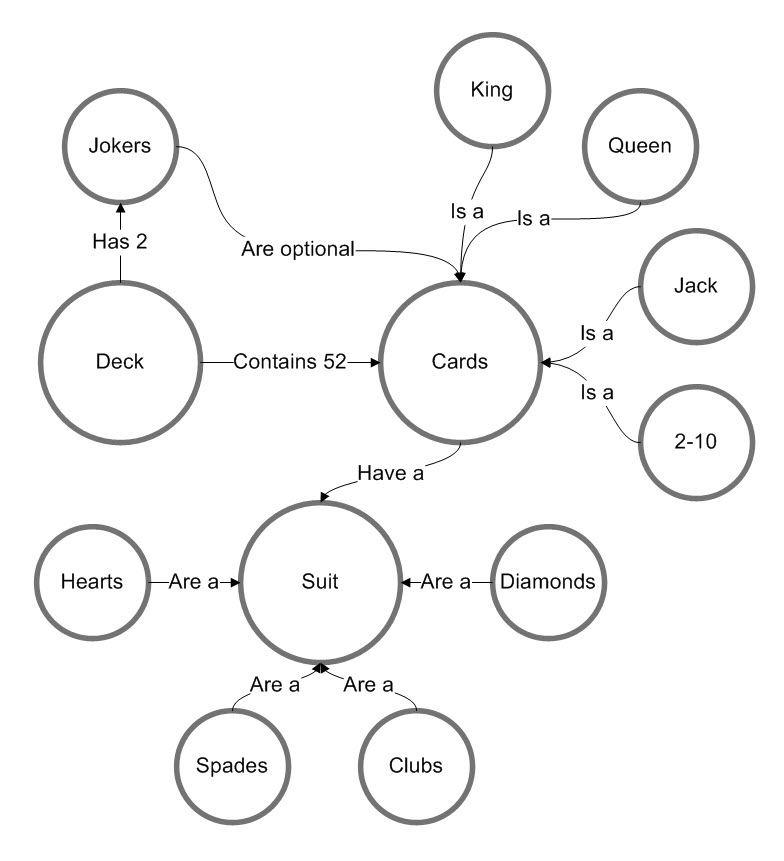
Note that I have intentionally connected elements in different ways to show how you can read things in many ways.
Additional layers can be added if it is useful. For example, you could add color to the circles in order to show how similar elements relate to each other and form groupings. You can also put containers around related elements. This isn’t a rigid method, add whatever helps you make sense of the topic.
This works perfectly for mapping out the elements of a board game and visually seeing how all the parts interrelate with each other. This can help the game designer in many ways:
- Discovering connections you hadn’t anticipated
- Identify little-used parts that can be eliminated
- Assess the overall complexity of the game (more parts = more complex)
- Visualize the openness of the game – or the amount of flexibility players will have with the parts
- Discover new ways to integrate parts and create multiple paths through the game
Here is an example of a concept model I created to understand the parts of Settlers of Catan.

It is worth noting that this diagram does not contain every single possible relationship. There are times when you leave some out because it just clutters things up. This is risky though. For example, in this chart, I have failed to detail all of the possible relationships that development cards might have. They can also allow you to do things like collect resources, build roads, or move the robber. To flush these types of details out it might make sense to create noun objects for each type of card. Then these could be connected to all the elements they relate to. In this case, it might make sense to make a separate chart just showing what the deck of development cards can do.
The reason I started using this method was to better understand the parts of games and how they relate to each other. As it turns out, doing this really really helps you see how game parts are used.
Simplified Concept Model
The next step I put these concept models through is not something I do in the UX world, but for games, I have found it to be a very useful approach. With a complete chart that plots out every element of the game, I work to make a second version. In this second version, I simplify and condense elements. I also remove extraneous elements that are less important. The goal here is to make a more simplified chart that portrays the general flow of the game.
Here is the simplified version of the Settlers of Catan chart shown above.

The purpose of this is to seek to understand the core flows of the game. Some parts of the game (like a pawn or dice) aren’t really key to understanding how the game flows. Both layers of detail are helpful depending on what your goal is.
Decision Tree
Building a concept model leads to another interesting artifact. Once you see all the parts of the system and consider how they relate to each other you can easily assess and plot out all the decisions the player is able to make. Making a decision tree is fairly easy and really depends on the specifics of the game. In general, it plots out all the choices a player is able to make. The quantity of decisions directly relates to the amount of control the player can inject into the game. If the players have too few choices the game can become predictable or perhaps just boring. In small, faster games, a limited decision tree is ok. But in larger and longer games one expects to be able to make more choices and through them have a greater influence on the game.

Just to clarify, these are not long-term choices the player gets to make (such as an overall strategy). Rather these are just the immediate choices a player gets to make on their turn.
There is no “right” way to do all of this, so use whichever method works best for you. The general theme here is to map things out visually so you can see the full range of options a game presents and how all the bits interconnect. I have found over the years that I often use these early on to think about the general flow of a game. And then in contrast I use similar charts later in the process to make sure I fully understand how all the parts connect. For me personally, this has been really helpful when I attempt to make games with multi-use tokens and cards.
A real life example
I am slowly working on a game design with a friend, and I found that we had lots of ideas about things, but we were having a hard time keeping them straight. Even worse, we were having a hard time picturing everything in the same way. So I made a mental model of all the parts as I heard them. It gave us something concrete to look at and get on the same page. The diagram is below, and you can see that it’s relatively large and complex. It is no surprise that we had trouble forming a shared vision of the game. A nice side effect is that we didn’t look at it for several months. Then, when we returned to it, we could more easily pick up where we left off. We also see it with fresh eyes and can simplify things.
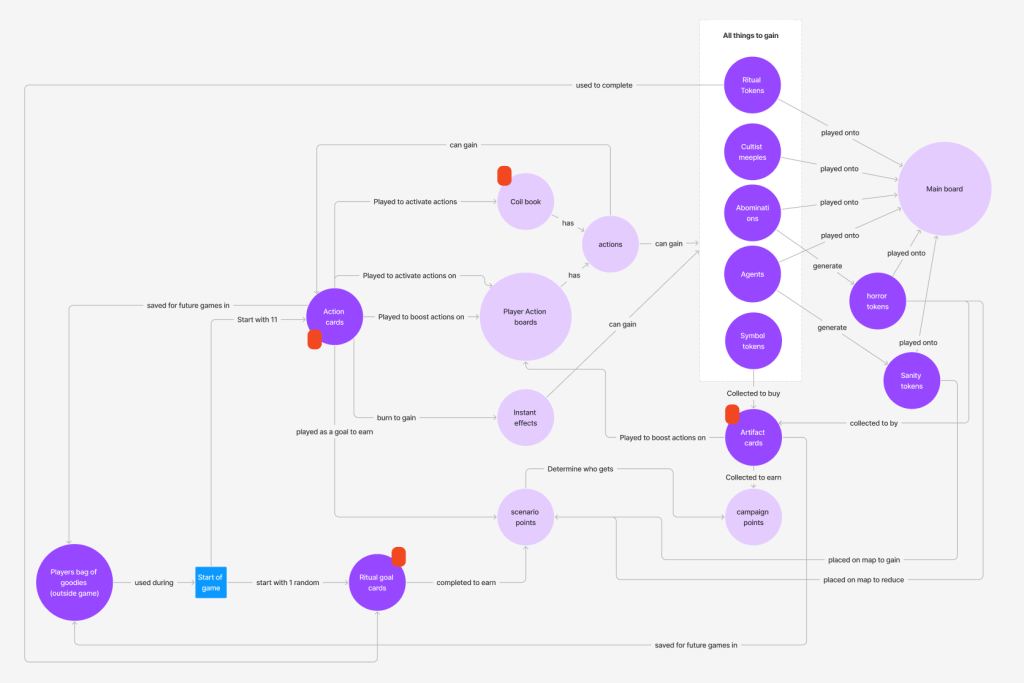
You will perhaps notice I added some other things to this diagram. I used some color coding and some extra icons to denote things. In particular all the dark purple circles are physical components. And then the red shapes are cards. Don’t be afraid to layer in other helpful aspects of the game. Again, it’s all about forming a shared vision of what the game could be.
Models like these are so helpful for getting everything out of our heads and into a rough format we can discuss with others. But don’t underestimate how they can help a single person working alone. It is powerful to see how our ideas function.
